As soon as I heard that a Claude extension (or add-on) had come out for Google Workspace, I gave it a quick try. I was a bit disappointed when Gemini first landed in Google Workspace, so I wondered how Claude would do.
It might be a small thing, but it’s exactly the feature that scratches my itch, so I have a go-to command for testing at times like this. I have a slide template I personally use as a sort of weekly report, and it’s a pretty labor-intensive file, so it’s a bit of a pain to maintain. It lives in Google Slides, one slide per week. The body looks like a table, but it’s actually all text boxes. A 6×7 grid of text boxes. So every time, I copy the previous week’s slide, paste it into a new page, and update the week number along with that week’s start and end dates. I could have just done all the tedious work at the start of the year, but instead I keep pushing it off, week by week, onto next week’s me. And isn’t this exactly the kind of spot where an AI agent should step in?
“Copy page 25, put it in as page 26, and update the week number and dates.”
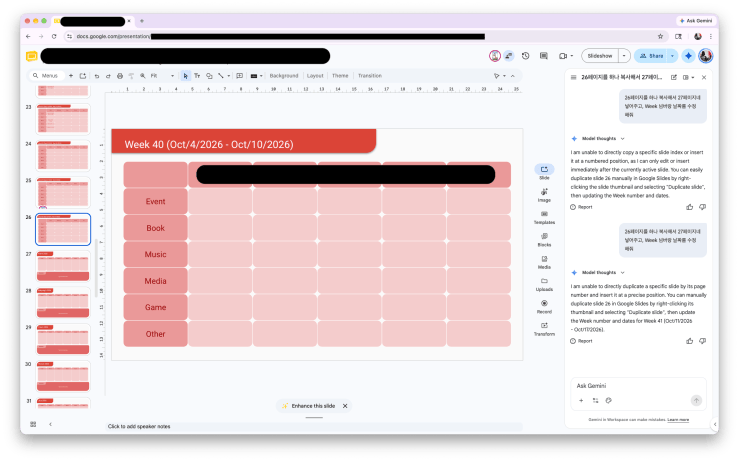
Simple enough command, right? Gemini, back when it was first introduced to Google Workspace, failed at this. I don’t remember the exact message, but the Gemini of that time answered with something like, it had a limitation of only being able to work on one page at a time. Has today’s Gemini changed? It seems to have improved a little, but it still couldn’t scratch my itch. It said it could only edit the page I was looking at and the next one, so I graciously moved to page 26 myself and gave the command again, only to be told it can’t copy and paste a page into a specific position. And then it told me to right-click the thumbnail on the left and copy it myself. That’s what I’ve been doing all along. I’m asking you precisely because I don’t want to do that.
So how about Claude?
— — —
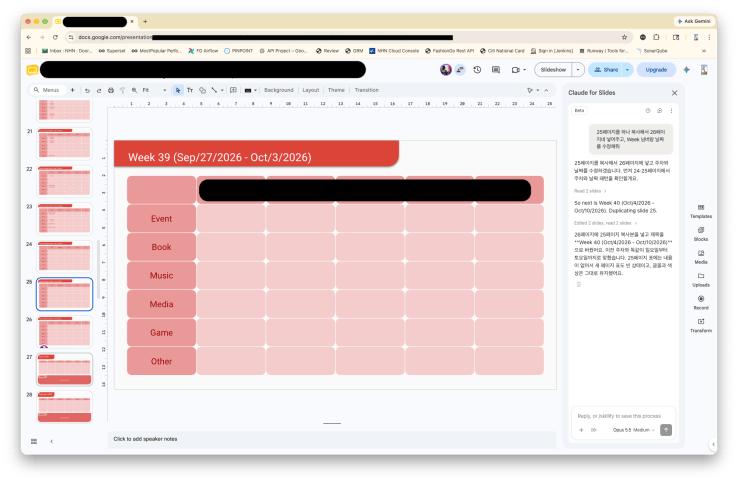
I’ll copy page 25 into page 26 and update the week and dates. First, let me check the week and date pattern on pages 24 and 25.
Read 2 slides
So next is Week 40 (Oct/4/2026 – Oct/10/2026). Duplicating slide 25.
Edited 2 slides, read 2 slides
I put a copy of page 25 in page 26 and changed the title to Week 40 (Oct/4/2026 – Oct/10/2026). Just like the previous weeks, it runs from Sunday to Saturday. The table on page 25 was empty, so the table on the new page is empty too, and I kept the fonts and colors as they were.
— — —
Yes, this is what I was looking for. While I was at it, I had it create every week through Week 52 (that part’s not in the screenshot).
— — —
I’ll add 12 slides for Weeks 41 through 52, in order, after page 26.
Add Week 41–52 slides
The title replacement only applied to the first slide, so I’ll fix the rest.
Fix week titles and check order
I added 12 slides for Week 41 through Week 52 on pages 27-38. They’re one week apart (Sunday-Saturday), and the title font and size match the existing ones (Roboto 18pt, white).
- Week 41: Oct/11/2026 – Oct/17/2026
- Week 52: Dec/27/2026 – Jan/2/2027
Following this sequence, Week 52 ends on January 2, 2027, so I left that date as is. The “***” page that used to be page 26 now starts at page 39.
— — —
There was one inconvenience, though. It seemed you can only use it if your Google account and Claude account share the same email address. I use three Google accounts, and when I tried adding the Claude extension from a Google account different from the one I used for my Claude subscription, it just wouldn’t connect. This might be a restriction on Google’s side. Looks like I’ll have to switch my Claude subscription account after all.
I still need to put it through more work in Slides and Docs, but Claude is already the clear winner.

