While working with databases, we might be in a situation to solve the problems related with handling max values or min values. “What product has been sold at highest price in last 5 years?”, “Since 2000, who has hit the most home-runs in a season and which year was it?” or “On which date each countries has recorded the most new COVID positive cases?” In this post, we will be discussing some ways to solve these problems.
TL; DR
Try to use window functions when it come to selecting row with max (or min) value in SQL.
Setting Up The Test Environment
Before moving forward, let’s define a sample table as following.
CREATE TABLE orders (
    order_id INT NOT NULL AUTO_INCREMENT PRIMARY KEY,
    product_id INT,
    price INT,
    order_date DATE
);
And insert some dummy data; 1)
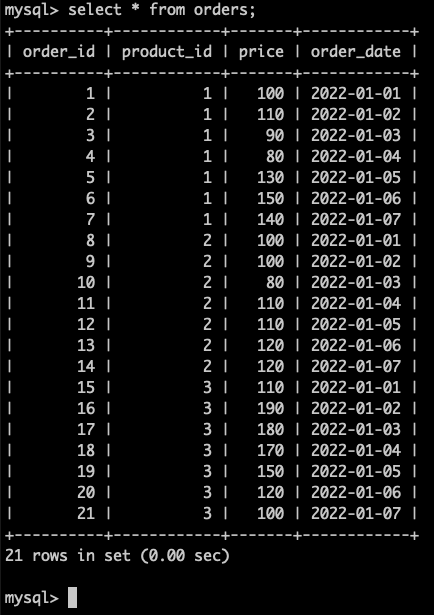
We have three products sold at different prices each day. And the table ‘orders’ has kept track of the change of the prices of the products at each day.
Question 1. What was the highest price of all the products over all dates?
The most simple answer would be the one using the MAX() function.
SELECT MAX(price) FROM orders;
If we may off from standard SQL, LIMIT or TOP could be used.
SELECT price FROM orders ORDER BY price DESC LIMIT 1; -- MySQL

SELECT TOP 1 price FROM orders ORDER BY price DESC;   -- MS SQL
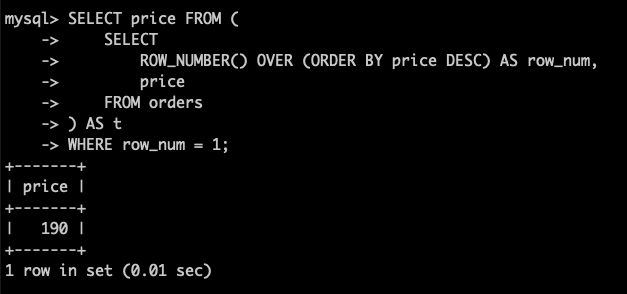
If we prefer to follow the standards, window functions2) would be a good option.
SELECT price FROM (
    SELECT
        ROW_NUMBER() OVER (ORDER BY price DESC) AS row_num,
        price
    FROM orders
) AS t
WHERE row_num = 1;
Any of above queries will return following result.
Question 2. Which product has been sold at the highest price, when was it and how much was it?
Not only the max value, other columns in the same row should be returned. This could not be done only with MAX() function. If we are using the SQL-92 standard or older, subqueries can be used.
SELECT product_id, price, order_date
FROM orders
WHERE price = (SELECT MAX(price) FROM orders);
Although this query would return a correct answer, there would be performance issues. Because the column on which max value is requested (‘price’ in this case) does not have index in most cases, which results in another full scan on the table. This make the query slower.
To optimize above query, we can use window functions.
SELECT product_id, price, order_date
FROM (
    SELECT
        ROW_NUMBER() OVER (ORDER BY price DESC) AS row_num,
        product_id,
        price,
        order_date
    FROM orders
) AS t
WHERE row_num = 1;
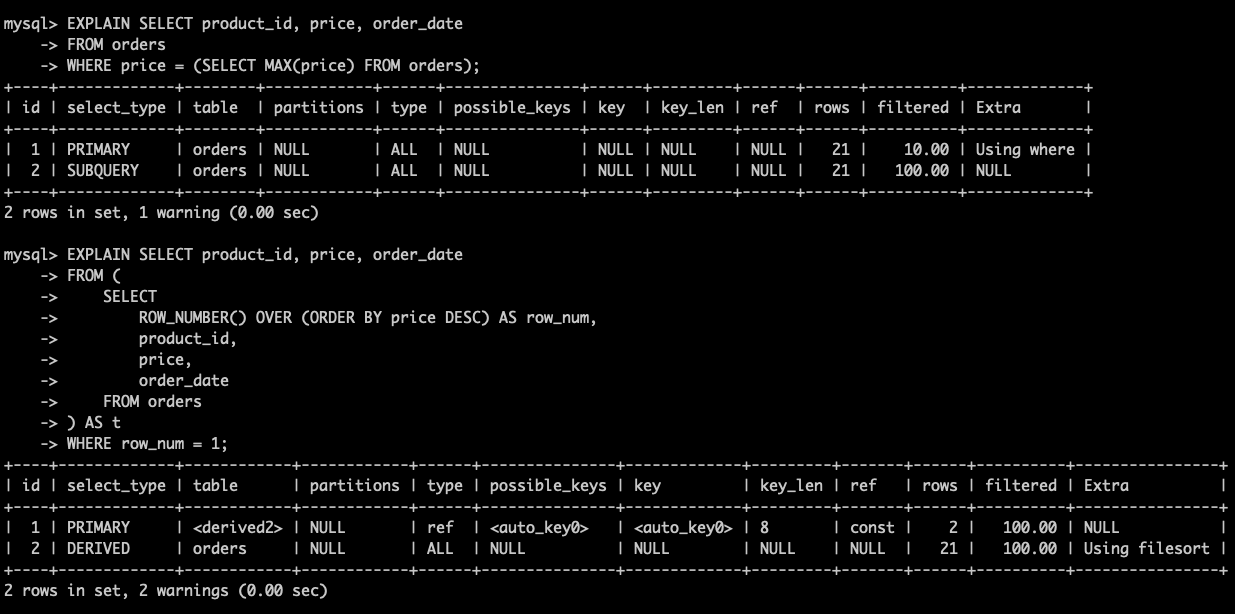
Explain statement in MySQL shows the performance differences. Without window functions, there will be two full scans on the ‘order’ table. But with window functions, only one full scan and one index scan will be executed. There would be almost no performance impact in this size of example but if tables get bigger, the performance difference will.
Question 3. What was the highest price of each products?
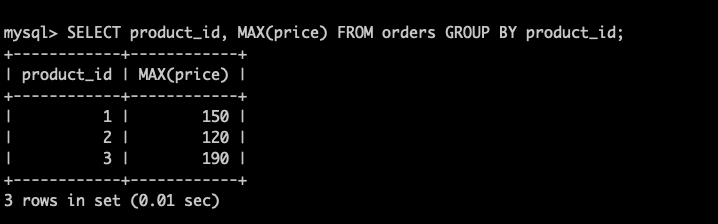
A simple query with MAX() and GROUP BY will do.
SELECT product_id, MAX(price) FROM orders GROUP BY product_id;
Question 4. What was the highest price of each products and when was it?
The phrase ‘when was it?’ makes the problem little complicated. For each group, not only the max value, other columns in the same row should be returned. The easiest way would be using JOIN.
SELECT o.product_id, o.price, o.order_date
FROM orders AS o
JOIN (
    SELECT product_id, MAX(price) AS price
    FROM orders
    GROUP BY product_id
) AS t
ON t.product_id = o.product_id AND t.price = o.price;
But this also induces two full scans. As in the Question 2, window functions can help in optimizing this query.
SELECT product_id, price, order_date
FROM (
    SELECT
        ROW_NUMBER() OVER (
            PARTITION BY product_id ORDER BY price DESC
        ) AS row_num,
        price,
        product_id,
        order_date
    FROM orders
) AS t
WHERE row_num = 1;
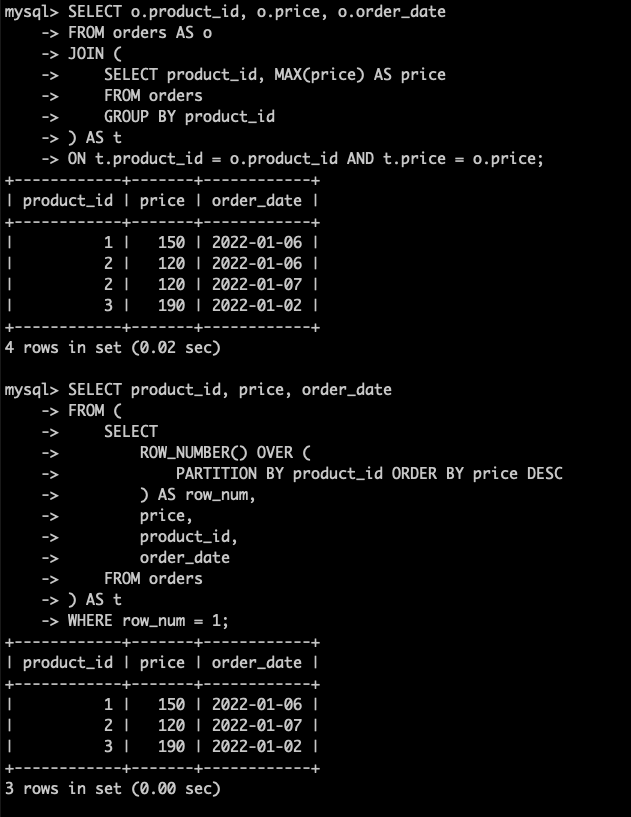
Wait. Above two queries return different results from each other. While the query with JOIN returns 4 rows, the other one returns only 3 rows. Which one would be the correct one?
The answer is both queries are all correct. Because the question was ambiguous. The question did not specifies how to handle a tie on the max value in price. So let’s re-define the question.
Question 4-1. What was the highest price of each products and when was it? (Do not break a tie, return all of them)
The query with JOIN in question 4 can be used as it is. The one with window functions needs a little fix, replacing ROW_NUMBER() with RANK().
SELECT product_id, price, order_date
FROM (
    SELECT
        RANK() OVER (
            PARTITION BY product_id ORDER BY price DESC
        ) AS row_num,
        price,
        product_id,
        order_date
    FROM orders
) AS t
WHERE row_num = 1;
It works! But why this happens? To understand this, try following query first.
SELECT
    ROW_NUMBER() OVER w AS row_num,
    RANK() OVER w AS 'rank',
    price,
    product_id,
    order_date
FROM orders
WHERE product_id = 2
WINDOW w AS  (PARTITION BY product_id ORDER BY price DESC);
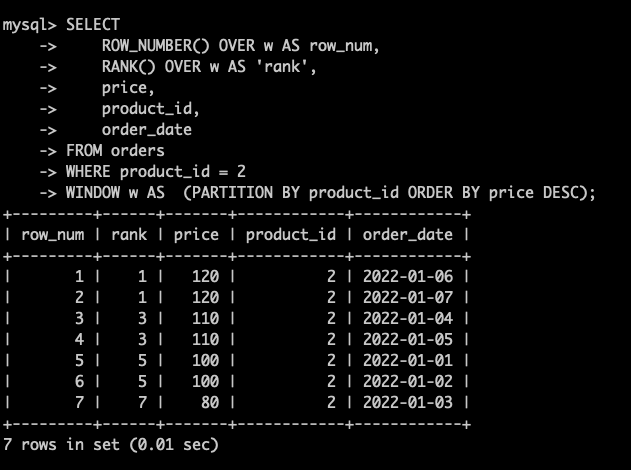
As their name, ROW_NUMBER() function gives each row a unique number while RANK() counts each row’s rank including a tie. This is the reason makes this difference.
The query performance? The one with window functions is definitely the better.
Question 4-2. What was the highest price of each products and when was it? (Break a tie by selecting the row with an older order_date)
The query with JOIN in question 4 should be modified as following;
SELECT o.product_id, o.price, MIN(o.order_date) AS order_date
FROM orders AS o
JOIN (
    SELECT product_id, MAX(price) AS price
    FROM orders
    GROUP BY product_id
) AS t
ON t.product_id = o.product_id AND t.price = o.price
GROUP BY o.product_id, o.price;
The query with window functions should also be modified as following;
SELECT product_id, price, order_date
FROM (
    SELECT
        ROW_NUMBER() OVER (
            PARTITION BY product_id
            ORDER BY price DESC, order_date ASC
        ) as row_num,
        price,
        product_id,
        order_date
    FROM orders
) AS t
WHERE row_num = 1;
Again, the one with window functions shows the better performance.
Conclusion
There are various ways to write a query handling max (or min) values, but the one with window function is the better solution in most cases.
References
- https://learnsql.com/blog/history-of-sql-standards/
- https://en.wikipedia.org/wiki/SQL_syntax
- https://en.wikipedia.org/wiki/Select_(SQL)#Limiting_result_rows
- https://en.wikipedia.org/wiki/Window_function_(SQL)
- https://dev.mysql.com/doc/refman/8.0/en/window-function-descriptions.html
- https://dev.mysql.com/doc/refman/8.0/en/using-explain.html
- https://dev.mysql.com/doc/refman/8.0/en/explain-output.html#explain_filtered
1) Insertion queries for the dummy data is as followings;
INSERT INTO orders (product_id, price, order_date)
 VALUES
    (1, 100, '2022-01-01'), (1, 110, '2022-01-02'),
    (1, 90, '2022-01-03'), (1, 80, '2022-01-04'),
    (1, 130, '2022-01-05'), (1, 150, '2022-01-06'),
    (1, 140, '2022-01-07'), (2, 100, '2022-01-01'),
    (2, 100, '2022-01-02'), (2, 80, '2022-01-03'),
    (2, 110, '2022-01-04'), (2, 110, '2022-01-05'),
    (2, 120, '2022-01-06'), (2, 120, '2022-01-07'),
    (3, 110, '2022-01-01'), (3, 190, '2022-01-02'),
    (3, 180, '2022-01-03'), (3, 170, '2022-01-04'),
    (3, 150, '2022-01-05'), (3, 120, '2022-01-06'),
    (3, 100, '2022-01-07');
2) Window functions are add to the SQL standard since SQL:2003
 Kirin's Technology Essay