Apache Airflow is a platform to programmatically author, schedule and monitor workflows. For whom has lots of scheduled jobs to run, Airflow is quite a mind-blowing platform. Although it also has some weird points, I think the good overcomes the bad. Among the many characteristics of Airflow, let’s focus on job scheduling here.
Actually, setting up job schedules or DAGs run schedules in Airflow is very easy and straight forward. You can use keyword like hourly, daily, weekly or monthly to setup job schedules. If you are used to cron, you can use the same syntax to setup more complex schedules. The problem is some jobs could be executed out of your expectation. To be more specific, you might encounter events similar to followings:
- You’ve set a job or DAG to be run on every 1 hour, i.e. 00:00, 01:00, 02:00 and so on. When you turned on the job at 15:30 expecting it would be run on 16:00 for the first time, the job run right away. After that, all went as scheduled.
- You’ve set a job or DAG to be run on every 1 hour, i.e. 00:00, 01:00, 02:00 and so on. You’ve also set the start date and time as of 16:00 today. You turned on the job at 16:00 expecting it would be run right away for the first time, but the job didn’t run on 16:00. Instead, it had its first run on 17:00. After that, all went as scheduled.
This is quite frustrating. You might think you’ve done something wrong. But it’s perfectly correct behavior of Airflow.
Unlike most other workflow schedule platforms which just specifies job execution times, to control job execution schedules Airflow adopts a concept, Timetable. A timetable defines a data interval each job or DAG and a job is executed after a data interval ends. But the job might be run as soon as the data interval ends or much more later. The only thing guaranteed is that the job won’t be started before its data interval ends.
Seeing Airflow’s DAG runs page, this would be more clear. There are execution date, queued at, start date and end date of each DAG runs. The meaning of each columns are as following:
- Execution Date: the starting point of a data interval
- Queued At: when this job have become ready to be run and been queued for execution
- Start Date: when this job have been really executed
- End Date: when the execution of this job have been completed
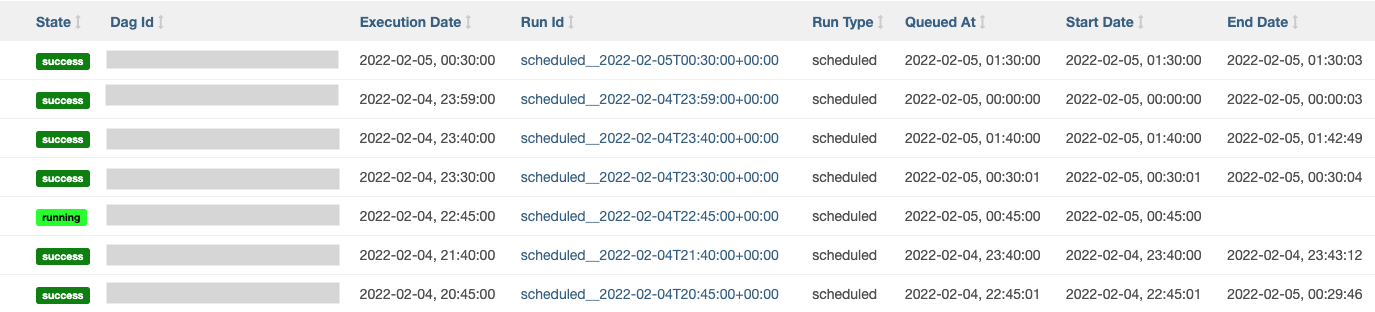
One thing you can notice is that there’s no column indicating the ending point of a data interval. Typically the ending point of a data interval is the starting point of the next data interval.
A job is queued for the run after its data interval has ended. If Airflow has lots of jobs in running, it have to wait before it could be executed. But most of the cases, the job will be started right away. Also there could be a situation that queuing could not be done just after the ending point of a data interval. This is why “Queued At” and “Start Date” are being keep tracked. “End Date” is so obvious that it don’t have to be explained more.
As you can see, “Execution Date” is the only timestamp which could be determined by logic and never be changed by external conditions. So Airflow use this as a unique identifier for each DAG run, “Run Id”. Once you understand the concept of the timetable, you will agree that this is reasonable. But I agree that this is quite confusing for the starters. Anyway the fact that “Execution Date” of a job is different from its actual “Start Date” is not an easy concept to accept.
Let’s back to the weird examples.
- You’ve set a job or DAG to be run on every 1 hour, i.e. 00:00, 01:00, 02:00 and so on. When you turned on the job at 15:30 expecting it would be run on 16:00 for the first time, the job run right away. After that, all went as scheduled.
When you turned on the above job at 15:30, the current data interval was “15:00 ~ 16:00” and Airflow prepared the run for the Execution Date, “15:00”. (Remember that the execution date is the starting point of a data interval.) At the same time, the system found that the job for the previous data interval, “14:00 ~ 15:00” had not been queued yet. So it queued and started the run for the Execution Date, “14:00”.
- You’ve set a job or DAG to be run on every 1 hour, i.e. 00:00, 01:00, 02:00 and so on. You’ve also set the start date and time as of 16:00 today. You turned on the job at 16:00 expecting it would be run right away for the first time, but the job didn’t run on 16:00. Instead, it had its first run on 17:00. After that, all went as scheduled.
When you turned on the above job at 15:30, Airflow did nothing because it’s before the DAG’s start date. At 16:00, the system had begun to work finally. Its first data interval was “16:00 ~ 17:00”. As a job could be started after the ending point of the data interval, the first job had to wait until “17:00” to be executed.
References
- “Timetables – Airflow Documentation”. airflow.apache.org. The Apache Software Foundation. Retrieved 2022-02-06.
- “Scheduling and Timetables in Airflow – Astronomer”. http://www.astronomer.io. Astronomer. Retrieved 2022-02-06.
 Kirin's Technology Essay